Materials and marked meshes
A geometry, its physical labels and its PDE coefficients are separate objects. Material IDs identify regions; boundary IDs identify faces. Neither kind of tag automatically applies a boundary condition or assigns a permeability.
1. Generate two marked material regions
The following Gmsh geometry divides the unit square at \(x=0.5\). Both surfaces share the same straight interface curve, so the triangular mesh is conforming across the material jump.
import gmsh
from pymhm.io.planar import from_gmsh

gmsh.initialize()
try:
    gmsh.model.add("two-materials")
    coordinates = [(0, 0), (0.5, 0), (1, 0), (1, 1), (0.5, 1), (0, 1)]
    points = [gmsh.model.geo.addPoint(x, y, 0, 0.15) for x, y in coordinates]
    edges = [
        gmsh.model.geo.addLine(points[a], points[b])
        for a, b in [(0, 1), (1, 2), (2, 3), (3, 4), (4, 5), (5, 0), (1, 4)]
    ]
    left_loop = gmsh.model.geo.addCurveLoop([edges[i] for i in [0, 6, 4, 5]])
    right_loop = gmsh.model.geo.addCurveLoop([edges[1], edges[2], edges[3], -edges[6]])
    left = gmsh.model.geo.addPlaneSurface([left_loop])
    right = gmsh.model.geo.addPlaneSurface([right_loop])
    gmsh.model.geo.synchronize()
    for tag, surface, name in [(1, left, "matrix"), (2, right, "channel")]:
        gmsh.model.addPhysicalGroup(2, [surface], tag)
        gmsh.model.setPhysicalName(2, tag, name)
    for tag, edge, name in [(10, edges[5], "inlet"), (20, edges[2], "outlet"),
                            (30, edges[6], "material interface")]:
        gmsh.model.addPhysicalGroup(1, [edge], tag)
        gmsh.model.setPhysicalName(1, tag, name)
    gmsh.model.mesh.generate(2)
    data = from_gmsh()
finally:
    gmsh.finalize()
Use the meshing profile. Gmsh has process-global state: serialize calls in a
process, and preserve any existing caller-owned session/model when embedding
this construction in another application. The built-in generators follow that
ownership contract; see mesh generation and exchange.
2. Inspect the labels before assigning physics
import numpy as np

assert set(np.unique(data.cell_tags)) == {1, 2}
inlet = data.boundary_tags[10]
outlet = data.boundary_tags[20]
interface = data.face_tags[30]
assert not set(interface).intersection(data.mesh.boundary_faces)

permeability_by_id = {1: 1.0, 2: 100.0}
cell_permeability = np.array([permeability_by_id[int(tag)] for tag in data.cell_tags])
The internal interface is present in face_tags, while boundary_tags contains
only exterior faces. IDs 1 and 2 are material labels, not offsets into an array.
The canonical face normal and its macrocell incidence signs come from the
mesh, independently of the imported curve ordering.
In a local UFL provider, a macrocell that lies entirely inside one material uses a constant coefficient:
from dolfinx import fem

binding = local.native_space(degree=1)
K = fem.Constant(binding.mesh, np.float64(cell_permeability[local.cell]))
a = K * ufl.inner(ufl.grad(p), ufl.grad(v)) * dx
Define p, v and dx on that binding as in the
UFL guide. If the material interface crosses
a macrocell, retain its fine material mesh/tags and integrate the coefficient
jump on those fine cells. Replacing it with a macrocell average changes the
physical problem. The SPE10 application
uses a cellwise Cartesian tensor field and aligns integration with its material
grid; CartesianCellField evaluates one-sided values without averaging jumps.
3. Apply boundary groups explicitly
Select the desired essential or natural conditions using the external
face groups. For a bound normal-flux interface, GlobalContext.boundary_data
integrates prescribed pressure and projects prescribed flux density. A marked
internal material interface remains coupled to both neighboring cells; it is
not an exterior boundary merely because it has a physical ID.
For a pure Neumann problem, verify the source/outward-flux compatibility and declare the physical mean pressure. For pressure Dirichlet data, preserve the sign of the global pressure pairing written in the selected formulation. The MPI guide adds ownership rules for these same physical moments on multiple ranks.
4. Write a lossless exchange file
from pymhm.io.planar import read_mesh, write_mesh

write_mesh("materials.vtu", data, cell_data={"permeability": cell_permeability})
restored = read_mesh("materials.vtu")
assert restored.physical_names == data.physical_names
assert restored.face_tags == data.face_tags
np.testing.assert_array_equal(restored.cell_tags, data.cell_tags)
np.testing.assert_array_equal(restored.cell_data["permeability"], cell_permeability)
VTU retains physical IDs/names, internal/external groups and point/cell fields. Gmsh 2.2 also retains geometry/groups and compatible point fields; tagged line blocks plus triangle cell fields require VTU under the documented meshio reader contract. Unsupported metadata exports raise an error instead of losing labels.
5. Preserve labels during nested refinement
from pymhm.meshes.refinement import refine_triangles

refinement = refine_triangles(data.mesh, marked=data.cell_tags == 1)
new_material_ids = data.cell_tags[refinement.parent_cells]
new_interface_faces = np.flatnonzero(
    np.isin(refinement.parent_faces, data.face_tags[30])
)
Cell ancestry transfers material IDs exactly. Face ancestry transfers a physical curve group to its child edges; new interior fine edges have no old face parent. The refined topology computes its own normals and incidence signs. A nonnested remesher instead requires reapplying the physical material and boundary description; it does not provide this parent map.
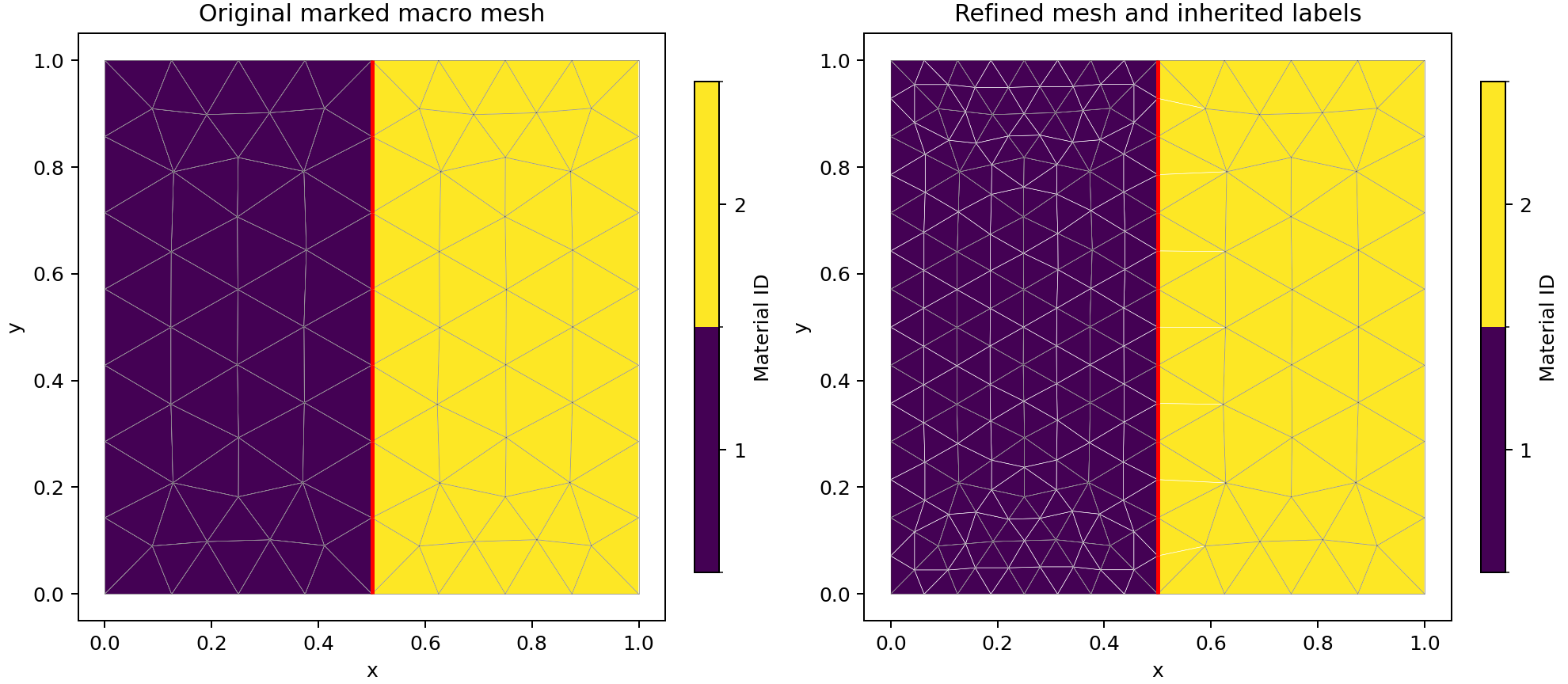
The marked-material notebook executes this Gmsh construction, real VTU round trip, field/tag equality checks and exact ancestry transfer before generating the figure.
Three-dimensional tags
VolumeMeshData stores an integer material ID per volume cell and an integer
tag per geometric face, including interior interfaces. It accepts tetrahedra,
affine prisms, trilinear hexahedra and supported star-shaped polyhedra. Use
volume generation/exchange
for connectivity conventions and VTU round trips. Volume physical-name strings
and overlapping face IDs are outside that adapter's contract.
The mesh-exchange notebook executes real exchange files for all four volume families.
References
- Gmsh reference manual: CAD entities, physical groups, conforming geometry and mesh generation.
- meshio documentation: exchange formats, cell blocks and attached physical fields.